RegexpMatch

Returns True if a string matches a regular expression.

Syntax

RegexpMatch(string, pattern)

stringRequiredThe string to search.patternRequiredThe pattern to match within the subject.

๐Ÿ“˜When the regular expression you want to use contains a slash, quotation or other special character, you will need to use a backslash (\) to escape the special character. Regexp can vary based on the databases. Check the documentation of the database you use to find the correct syntax.

Examples

Example 1:

Check if a name starts with an uppercase letter, followed by one or more lowercase letters, and then has another uppercase letter followed by one or more lowercase letters.

RegexpMatch([Name], "^[A-Z]{1}[a-z]+ [A-Z]{1}[a-z]+$")

Example 2:

Check if a string matches the social security pattern 'xxx-xx-xxxx'

Returns true.

Example 3:

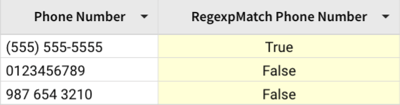
Check if a string matches the phone number pattern '(xxx) xxx-xxxx'

Example 4:

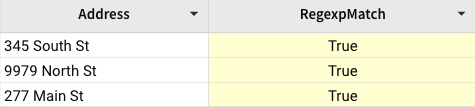
Check if an address starts with a numeric characters.

Last updated

Was this helpful?