> For the complete documentation index, see [llms.txt](https://support.meetuma.ai/uma-knowledgebase/llms.txt). Markdown versions of documentation pages are available by appending `.md` to page URLs; this page is available as [Markdown](https://support.meetuma.ai/uma-knowledgebase/release-notes/web/2025/v3.2.2-12th-august-2025.md).
# v3.2.2 - 12th August 2025
## ⚒️ **Resource Amenities**
We’ve introduced a **company-wide amenities management system** to make discovering and booking the right workspace easier than ever.
With **Resource Amenities**, admins can:
* Define available amenities per building
* Assign amenities to individual resources like desks and meeting rooms
* Manage items such as monitors, whiteboards, standing desks, and more
For users, this means:
* The ability to **filter resources on the My Floor page** by the amenities that matter most
* Greater transparency into what each space offers
* Smarter booking decisions that support hybrid work needs
Whether you’re looking for a desk with a monitor or a meeting room with video conferencing, **Resource Amenities** ensures you can quickly find and book the right space to be productive.
***
## 🔍 **Enhanced My Floor Filtering**
As part of this update, we’ve also upgraded the **My Floor** page filter. You can now combine **resource type**, **capacity**, and **amenities** into a **single filter criteria**.
\
This makes it easier to:
* Show or hide resources based on exactly what you need
* Discover the perfect workspace for any task in fewer clicks
Whether you’re searching for a large meeting room with a whiteboard or a quiet desk with a monitor, UMA now makes it even faster to find your perfect spot.
***
## 🕵️ **Privacy Preferences**
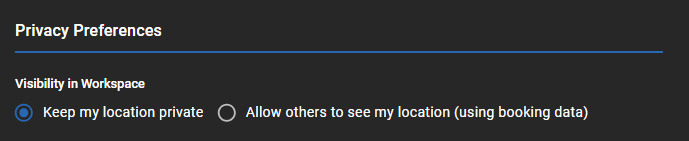
We’ve introduced **Privacy Preferences** to give admins more control over how user presence is displayed across UMA — and to provide users with the option to keep their location private when permitted.
**For Admins:**
* A new **“Allow users to control their visibility”** toggle is available in **Company Settings → Users tab**.
* **Default:** OFF — Privacy Preferences will not appear for users.
* When enabled, users will see Privacy Preferences in their **User Preferences** page.
**For Users (when enabled by admins):**
* **Default setting:** “Allow others to see my location (using booking data)”
* Alternative option: **“Keep my location private”**
**When “Keep my location private” is selected:**
* **Find a Teammate Search:** Your name will be hidden on both the Home and My Floor pages.
* **Resource Tooltips:** You will not appear as the organiser when others hover over a resource you’ve booked.
This update empowers organisations to balance **privacy, transparency, and workplace visibility** — supporting both open collaboration and individual preferences.
***
## 💧 **Quandify CubicMeter Water & Heat Sensor**
We’ve added support for the **Quandify CubicMeter**, a cutting-edge water and heat sensor that delivers **real-time, granular telemetry** to help facilities teams manage resources, detect issues early, and make data-driven operational decisions.
**What it Delivers:**\
When connected via a **LoRaWAN gateway**, the Quandify CubicMeter sends detailed LoRaWAN uplinks into UMA, giving you visibility into:
* **Water Consumption:** Track total volume in litres for billing, efficiency audits, and leak investigations.
* **Heat Consumption:** Monitor accumulated thermal energy (kCal) for heating analytics and system optimisation.
* **Leak Detection:** Get alerts for suspected or confirmed leaks before they cause damage.
* **Temperature Monitoring:** View min/max water temperatures and current ambient temperature.
* **Battery Health:** Monitor active and recovered battery voltages to predict maintenance needs.
* **Uptime & Sensing Status:** Detect device reboots or sensor failures to maintain operational reliability.
**Why it Matters:**\
This integration empowers facilities managers to:
* **Prevent costly water damage** with real-time leak alerts
* **Optimise heating and water usage** for ESG compliance and sustainability goals
* **Enhance preventative maintenance** with uptime, error code, and battery status monitoring
With the Quandify CubicMeter integrated into UMA, you can respond faster to anomalies, reduce utility waste, and maintain a safe, efficient workplace.
---
# Agent Instructions
This documentation is published with GitBook. GitBook is the documentation platform designed so that both humans and AI agents can read, navigate, and reason over technical content effectively. Learn more at gitbook.com.
## Querying This Documentation
If you need additional information that is not directly available in this page, you can query the documentation by asking a question.
Perform an HTTP GET request on the following URL with the `ask` and `goal` query parameters:
```
GET https://support.meetuma.ai/uma-knowledgebase/release-notes/web/2025/v3.2.2-12th-august-2025.md?ask=&goal=
```
`ask` is the immediate question: it should be specific, self-contained, and written in natural language.
`goal` is what the user is ultimately trying to achieve, the reason they need the answer. Sharing it helps GitBook give you a better, more relevant answer. A goal is most helpful when it describes the outcome the user wants rather than restating the question. For example, with `ask=how do I create an API token`, a goal like `automate deployments from our CI pipeline` lets GitBook tailor the answer to that use case.
The response will contain a direct answer to the question and relevant excerpts and sources from the documentation.
Use this mechanism when the answer is not explicitly present in the current page, you need clarification or additional context, or you want to retrieve related documentation sections.